90s computers: hardware, desktops and everyday software
Published
Explore a 90s computer through its hardware, operating system and applications. A beige PC running Windows 95, a music player with a custom skin and a modem connection each tell a different part of the story. The guides below explain those parts and offer current ways to try them.
On this page
For a whole machine in the browser, start with PCjs. For a desktop appearance, open the Windows guides. For a particular application, choose its history or recreation below.
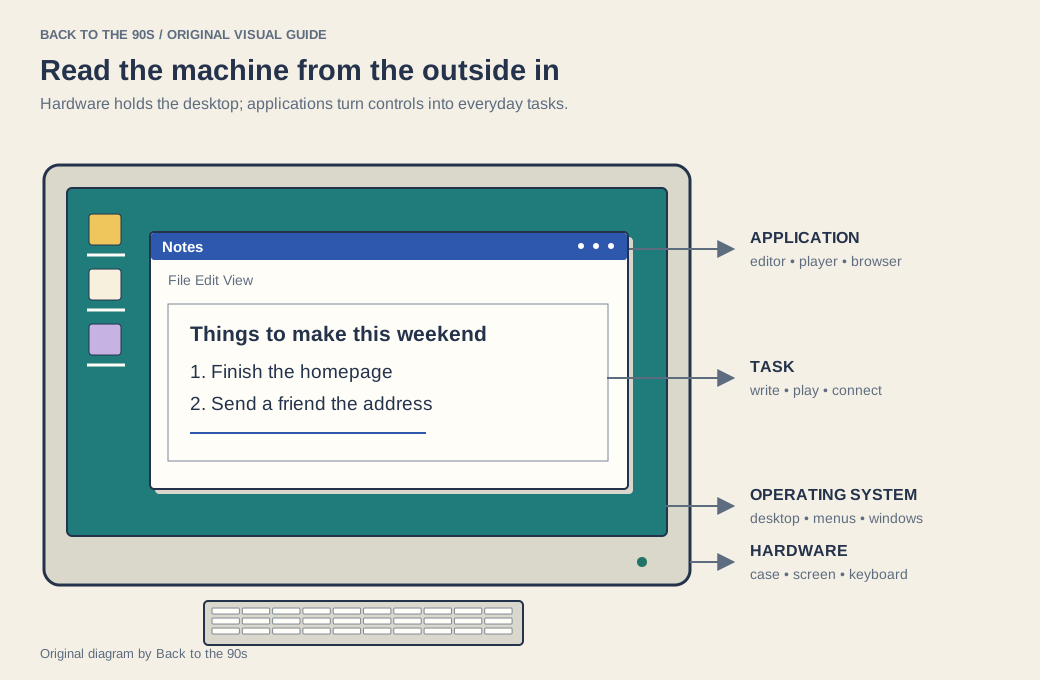
Read four layers together: the physical machine, its operating system, an application and the task someone performs.
Look at the physical arrangement
Record the machine, display, keyboard, pointing device and storage media. A separate monitor and tower suggest one arrangement; an integrated machine suggests another. The position of drives and connectors tells you how people inserted software, saved work and attached equipment.
For a present-day project, the retro PC case guide connects visual choices with a current build. Give the machine a job before choosing its shell: everyday work, a period-software experiment or a display piece asks for different decisions.
Read the desktop
Windows 95 and 98 design examines windows, menus, icons and control conventions. The classic Windows theme guide follows contemporary ways to revisit that appearance. Windows XP design shows the next chapter in color and depth.
Use the original HTML/CSS UI kit to study those forms in a small web project. Its labeled controls let you separate the visual treatment from the action each component performs.
Follow an everyday task
The 90s software guide starts with the applications people used. A music player leads towards Winamp skins. A break at the desk leads towards screensavers or desktop companions. A connection to friends leads towards chat systems.
The games hub groups play by activity. The dial-up guide explains what the computer needed to reach the internet.
Choose a complete machine or one application
PCjs emulates selected machines and software, including a Windows 95 exhibit. Use it to explore the relationship between hardware, booting and the desktop. Webamp recreates a particular music player; OldWeb.today runs browsers with live or archived pages.
For a webpage, you need both a browser environment and the page’s capture date. For a music-player skin, the player alone supplies the relevant context.
Keep the date precise
The 1990s contain several distinct software and hardware moments. A screenshot, an operating-system release and a computer model may come from different years. Keep each label with its source.
The Y2K computing history provides one useful boundary at the end of the decade. It shows how a seemingly small representation inside software could connect to work across many machines and organizations.