Webcore aesthetic: the personal web, GIFs and homepages
Published
Webcore reworks the personal web. It uses repeating backgrounds, tiny GIFs (still or moving images), window frames and links to an author’s interests.
On this page
What is Webcore?
Creators use Webcore for handmade homepages and strange digital collages built from older computer graphics. Internetcore is a related modern label. A journal, fan page or collection gives the graphics a purpose.
A row of favorite links tells you what somebody cares about; a tiny planet announces a love of space.
Early web authors used backgrounds, personal links and tiny graphics to mark out their own space. Artist Olia Lialina records those choices in her 2005 essay A Vernacular Web. Look at how each detail welcomes guests, shares an interest or guides the next click. Read the original essay
Spot the details
Choose two or three details that fit your page’s subject.
| Detail | What to notice | A useful way to use it |
|---|---|---|
| Tiled backgrounds | One small pattern repeats across a larger space | Put the texture around a calm reading panel |
| Browser and desktop windows | Title bars, raised edges, borders and small controls | Give one main panel the character of an old window |
| Small graphics | A planet, a spinning object, a tiny character or a divider | Choose a small graphic that fits the page’s subject |
| Personal navigation | Favorite links, a journal, a collection or a fan page | Name the places someone can actually visit |
| Handmade lettering | Fonts already on your computer, large titles and deliberately simple links | Use a playful heading while keeping body text comfortable |
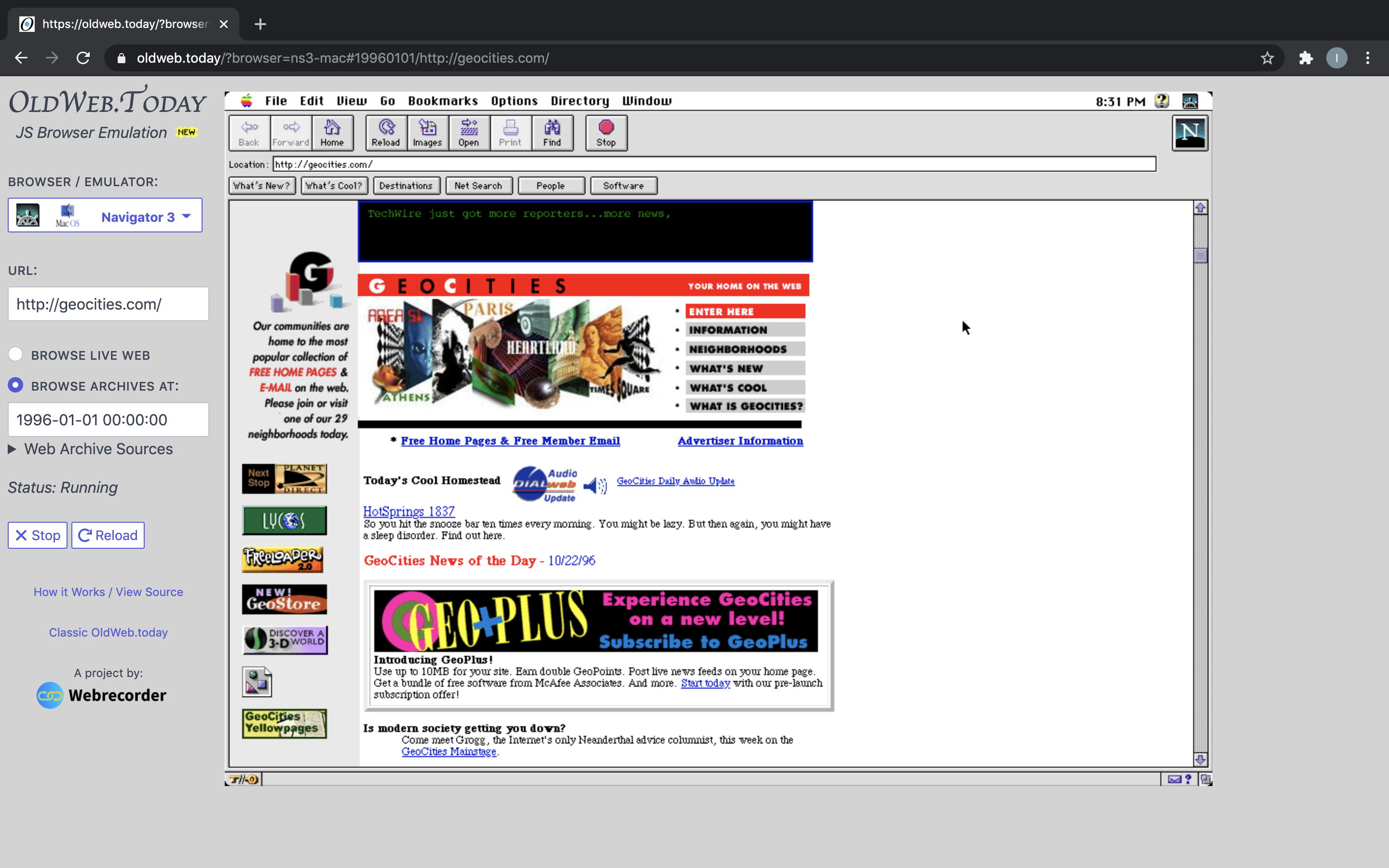
In the screenshot above, Netscape supplies the browser controls. GeoCities supplies the page and its links.
Buttons, blinkies and GIFs are different things
- GIF: an image format that supports still pictures and animation. GIF format reference
- Blinkie: a small banner, often animated, that displays an interest or identity. Browse Blinkies.cafe
- 88×31 button: a graphic that measures 88 pixels wide and 31 pixels high. Creators often use these buttons to link to other sites. Explore an 88×31 collection
Keep badges close to their original size so their details stay crisp. Put a graphic beside the link or heading it belongs with. Give readers a stop control for continuous animations.
Old Web, Y2K or Aero?
| Look | Start with this idea | Recognizable details |
|---|---|---|
| Old Web | Actual earlier websites and their design habits | Linked documents, personal pages, backgrounds and small graphics |
| Webcore / Internetcore | A modern remix of that computer world | Old-style windows, pixel objects, collage and sometimes digital surrealism |
| Digital Y2K | Turn-of-the-millennium visions of a shiny future | Translucent plastic, chrome, curves and software skins |
| Frutiger Aero | Glossy technology from the mid-2000s and early 2010s | Reflections, bright skies, greenery and transparent surfaces |
The University of Waterloo’s Computer Museum shows Aero’s glossy surfaces, nature images and 3D shapes. Aero museum guide
Give the old details a present-day purpose
In the under-construction section of her 2005 essay, Lialina examines how a sign could promise that a site would keep growing. Use a small update notice to name the page you are building, and leave useful links available around it.
Choose a repeating GeoCities-style background. Add an original icon or GIF beside a heading it fits. Link an 88×31 button to another page.
Make a tiny homepage
Type a title, choose a color and download your homepage. Open the downloaded page file in a browser to see your changes.
Make this homepage yours
Loading your tiny homepage…
A complete HTML file. Your title and color come with it.
The file contains everything needed to display the page. Open it in a text editor, replace the example note and add your own favorite links.
Try these three decisions:
- Choose a subject. Build around a favorite game, your drawings, a film diary or a collection of unusual websites.
- Choose one visual idea. Set the mood with a night sky, a checkerboard or a paper texture. Add a small graphic that means something to you.
- Make the next click obvious. Give every link a clear name.
Places to explore
Visit early websites: use the 90s websites guide to find original sites, restored pages, archives and new tributes.
Find archived GIFs: search GifCities, the Internet Archive’s search tool for GeoCities graphics. Follow an image back to its source page and see how its author used it. Internet Archive’s project announcement
Explore a huge collage: Cameron Askin made Cameron’s World from archived GeoCities pages. He published it in 2015. Follow its pictures and links to the pages that inspired it. Project credits · Publication history
Meet today’s site builders: browse Neocities. It has hosted personal websites since 2013. Pick an interest, visit a few sites and follow their authors’ favorite links. About Neocities
Finish your first homepage
Click every link from the downloaded page and check the layout at phone width.
Explore Back to the 90s for more ways to customize everyday browsing.
Explore related styles in the 90s and 2000s aesthetics collection.