Space Jam’s 1996 website: a tour of its original design
Published
Space Jam’s 1996 website places its menu links in a starfield. Jam Central holds film information, Behind the Jam explains the production, and Planet B-Ball follows the basketball connection. Its picture links lead fans to different parts of the film.
On this page
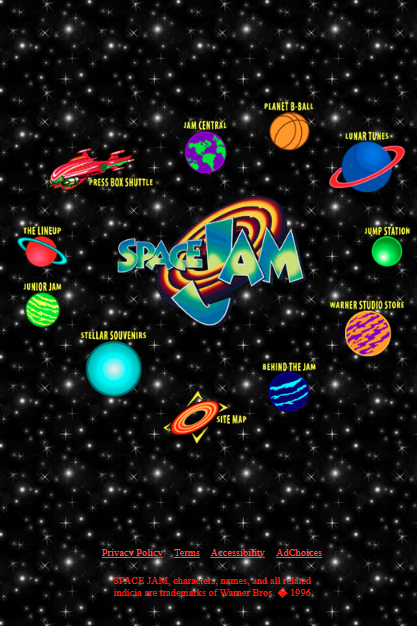
Use the planets or open the site map
The planets and other picture links sit around the film logo. Their positions make the menu a scene as well as a set of links.
For a text menu, open the official site map. It groups the campaign’s sections and links directly to the trailer, production notes, character sketches, basketball material and downloadable souvenirs. Use it when you want a particular item without guessing its planet.
Follow the production route
Behind the Jam shows character sketches and explains how the film team shot Michael Jordan’s scenes alongside the cartoon cast. It describes performers in green suits and masks who helped create the scenes.
The site map separates character development, animation sketches, behind-the-scenes footage and technical notes. Open the sketches to compare the drawn character with the film image, then read the technical notes to see how the team combined filmed people with drawn characters.
Planet B-Ball and a Netscape souvenir
Planet B-Ball connects the film with its NBA players. The site map also lists QuickTime VR views of the Jordan Dome, which let you look around the scene, and basketball filming clips.
One souvenir reached beyond the website: the Browser Icons page offered Mac Netscape users a spinning basketball in place of the browser’s glowing N. The old instructions use Apple’s ResEdit, a tool for changing parts of Mac programs, to replace the icon. The basketball then appeared among the browser’s own controls.
Look at the frame around the content
The saved Jam Central page uses frames. These split the browser window into sections that load separate page files. One section can stay in place while another shows new content.
When recording an old film website, keep both its menu and the page it opens. A close-up of the words alone leaves out the links used to reach them.
The old-browser guide shows how to view these pages in older browsers.
Build a small constellation yourself
Open the Small Things Observatory exercise. It uses original words and shapes drawn with CSS, the code that sets a page’s look. Three round links lead to paper boats, cloud notes and gardens.
Each link leads to a real section in the same page file. A return link brings the visitor back to the constellation.
Try these changes:
- Rename the three destinations around one interest of your own.
- Give each destination a distinct color while keeping its label readable.
- Write a short section that matches each link’s label.
- Move through the links with the keyboard as well as a pointer.
Compare the two early-web approaches
CERN’s project page uses text links to guide readers to technical information. Space Jam uses picture links to promote the film. In both, the page that opens needs to match the label.
The 90s websites directory keeps these examples together. For your own version, use the 90s-style website guide and the constellation exercise above.