Net art: browser stories, forms and desktop performance
Published
Net art makes the internet part of the artwork. Links shape a story; frames split a browser window into separate sections; buttons and boxes form a picture. In the 1990s work often called net.art, your clicks can change the work itself. Follow the action as closely as the image.
On this page
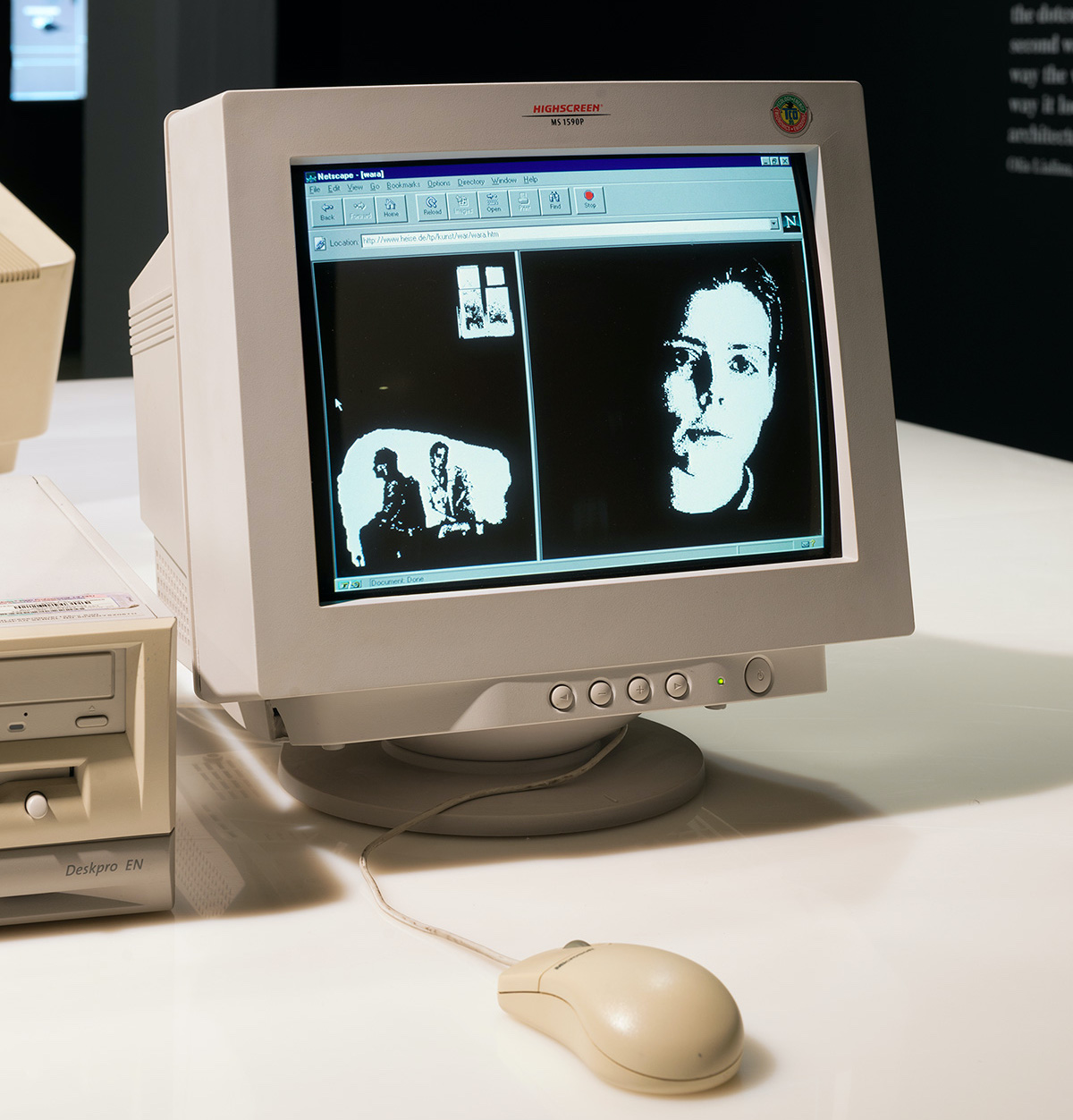
A link can change the rhythm of a story
Olia Lialina’s My Boyfriend Came Back from the War, from 1996, puts pieces of a story inside browser frames. Garage’s catalog account describes linked text and GIF pictures in a conversation between a reunited couple. You can follow its parts in different orders.
Your clicks affect the story’s pace and layout. You choose which piece to read next, and the frames put different pieces side by side. Pauses slow the exchange, while the frames keep parts of it apart.
Our close reading of Lialina’s browser frames follows those relationships in more detail.
Buttons and boxes can make a picture
Alexei Shulgin’s Form Art, from 1997, uses the buttons and boxes found in web forms. Rhizome explains how Shulgin arranged buttons and boxes into pictures. He then invited other artists to enter their own work in a competition.
A checkbox usually asks you to make a choice; an empty text box asks you to type. Here, you also notice spacing, repetition and shape. The browser draws these controls in its own style, so that style becomes part of the picture.
Try a simple viewing exercise. Look at a group of controls as if you were seeing an abstract drawing. Then imagine the everyday task each control usually serves. Switching between those views shows how Shulgin gives familiar tools a new use.
Computer actions can become a performance
JODI, the artist duo Joan Heemskerk and Dirk Paesmans, also make art from the way people use computers. Their My%Desktop, from 2002, records a performance on the computer desktop. The clicks and window movements become the show.
The My%Desktop article focuses on repetition, window movement and the role of the performer. Read it alongside the web examples to see how an artwork can use habits people learn from software.
Record the software as part of the reference
Rhizome’s account of Form Art identifies Netscape Navigator 3 as its original browser and explains that newer browsers may draw controls differently. Those differences change the work’s shapes. When comparing versions, record which browser runs each one, along with the title and artist.
These works also use different media. Visitors click through Lialina’s story and use Shulgin’s web controls. JODI’s My%Desktop shows recorded desktop actions on four video screens.
Ask what would change in a different medium
Use three questions to identify the browser’s role:
- What action does the work invite? Follow a link, select a control, wait, type, revisit or explore.
- What changes because of that action? A word, a layout, an image, a route, a sound or your understanding of the whole.
- What would a single still image leave out? The answer often identifies the work’s most important relationship with the browser.
Make a tiny browser-based work
Write six short fragments about one ordinary event: waiting for a bus, finding a photograph or returning to a room. Give each fragment one or two links. Let the link text express a thought such as “look again”, “remember the sound” or “leave”.
Draw the routes on paper first. Include one return path so a repeated fragment can gain a different meaning after the reader visits another page. Keep the page design simple so readers focus on the links.
Save each fragment as a separate HTML file, the code used for a web page, with short filenames such as wait.html and return.html. Link them using descriptive phrases, then follow every route from the first page. Check that the return link reaches a fragment whose meaning has changed after reading the pages in between.
For a personal site that combines writing with links readers can explore, continue with personal website ideas. To see how old browsers affect these works, explore old web browser emulators.
Explore related styles in the 90s and 2000s aesthetics collection.