JODI’s My%Desktop: turning screen actions into art
Published
JODI’s My%Desktop turns routine Mac OS 9 actions into a performance: windows multiply, files open and alert sounds interrupt the screen. Joan Heemskerk and Dirk Paesmans made the work in 2002. MoMA lists it as a twenty-minute video with sound shown on four screens.
The still below comes from the wider My%Desktop series. Curator Jon Satrom’s account describes versions from 2002 to 2010 that span several operating-system upgrades.
On this page
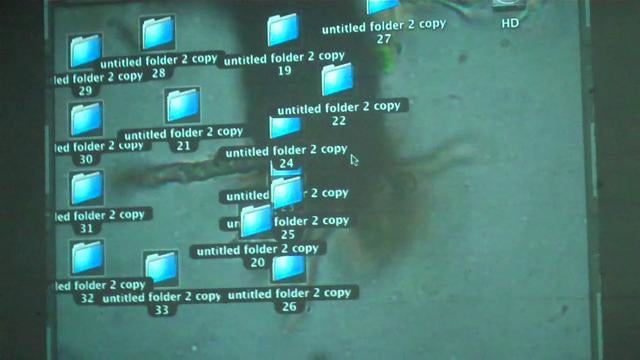
Start with the performers
MoMA explains that JODI connected a Macintosh to a camcorder and recorded their interactions with Mac OS 9, including performances before live audiences.
Follow one action and what happens next. A person opens a window, then moves it. The computer adds its own responses and sounds, which the artists arrange into a sequence.
This relationship makes the work a useful companion to Net.art. Both make art from the way software looks and works.
Who controls the action?
In My%Desktop, visitors watch recorded performances on four screens. In Lialina’s browser narrative, visitors’ own clicks help determine what they read. Compare who acts, who waits and how much control the software gives each person.
Look at windows as shapes
For one viewing, concentrate on the edges. Rectangular windows overlap, repeat and partly hide one another. A new window can cover an earlier one, leave a narrow strip visible or form a diagonal line across the screen.
That attention shifts your focus from the content inside each window to the arrangement of the desktop. The software supplies a set of standard shapes. The performer chooses where they appear, how many there are and when they move.
Describe a short passage as though it were a drawing: crowded, empty, layered, balanced or broken up. This makes you notice the desktop’s shapes as well as its tools.
Listen for the response
A computer alert ordinarily asks for attention at a particular moment. Repetition gives that sound another role. It can become a pulse, an interruption or a sharp accent within the action.
Listen to a short section while watching the movement that goes with it. Then listen again while paying attention to the gaps between sounds. Ask whether a cluster feels hurried, regular or unpredictable.
You can watch one screen or compare what happens across all four. That choice differs from using a single desktop to finish an everyday task.
Compare intention with expectation
Your own computer habits provide part of the experience. You may expect an alert to prompt a correction, a window to reveal information or a tidy desktop to make work easier. The artists keep opening, moving and repeating things, long after the usual task would be done.
Write down one moment that makes you want to intervene. What would you normally do next? Close a window, organize a file, wait for a response? The impulse identifies a rule you have learned through using software.
Now look at what the performance gains by continuing the action. Repeating an action can create a pattern. Adding windows can change the screen’s balance. A break can change the beat. An action used to finish a task can also become part of a performance.
Make an action score of your own
Make a practice folder with empty subfolders and text documents you can delete later. Choose three harmless actions, such as opening a document, moving its window and changing its size. Decide how long each action lasts or how many times you repeat it.
Write a thirty-second score, a plan of timed actions: spend five seconds opening three documents, ten seconds overlapping their windows, five seconds resizing one window and ten seconds holding the final arrangement. Perform it again with a longer opening pause and faster movements. Compare which sequence makes the growing pile of windows easier to notice.
Record the screen if you want to study the rhythm. Use your own invented material, and keep the recording clear enough to show the action.
Use the second recording to identify the timing change that altered the sequence most. Continue with glitch art for another way to use digital errors and breaks.
Explore related styles in the 90s and 2000s aesthetics collection.