Silicon Dreams: early CGI, surreal worlds and 3D design
Published
Silicon Dreams names the strange worlds of early computer animation. Shiny spheres change shape above tiled floors, while cameras glide through invented spaces. The animation makes even simple shapes look and move in unfamiliar ways.
On this page
Early computer animation on film
The Consumer Aesthetics Research Institute’s Silicon Dreams entry describes this dreamlike look. Its early 3D examples date from the late 1980s through the 1990s. It also records Mind Warp as an alternate label.
Steven Churchill’s biography at Gray Area traces his work collecting short animations into films. He made The State of the Art of Computer Animation in 1988. In 1990, he co-produced The Mind’s Eye with Odyssey Productions and Miramar Productions. VHS tapes and LaserDisc video discs brought these sequences into homes. Music and editing linked the separate demonstrations.
Tell early computer art from later remixes
Metalheart often packs complex 3D shapes into one crowded image. Vaporwave reworks older computer images for a later audience. Silicon Dreams takes you back to the early animations: watch how a camera approaches a reflective shape, passes through it or reveals an impossible space.
Watch the camera first
A scene changes dramatically with the viewer’s position. A low camera can turn a small geometric object into a monument. A high camera can make the same arrangement resemble a model or a map. A slow approach gives you time to inspect a surface; a fast pass draws attention to the route through the scene.
When watching a short animation, trace the camera’s path with a line on paper. Mark the moments when it changes direction or reveals a new object.
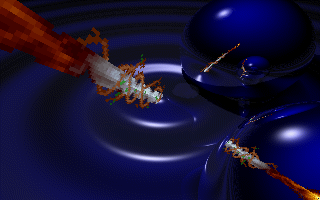
In the Second Reality picture above, bright highlights show the curves of the blue spheres. The small pointed shapes make the spheres look huge. Few familiar objects give you a firm sense of size.
Pay attention to what the surface suggests
A reflective material makes the surrounding world part of an object’s appearance. A repeating pattern helps you judge a surface’s size. A perfectly smooth shape can seem strangely detached from ordinary wear and handling.
Describe the surfaces: polished, dull, partly see-through, tiled, soft or hard. Then ask whether the objects behave as those surfaces suggest. A scene can feel dreamlike when its parts look real but behave in impossible ways.
Light ties those decisions together. A strong highlight reveals a curve. A shadow shows where an object sits above the ground. Colored light can give a simple arrangement a very particular atmosphere.
Distinguish the image from its method
A pre-rendered animation stores finished images for playback. A real-time demo asks the computer to draw them as it runs. Both can show moving shapes, but they pose different challenges. In a film, study the finished shots. In the demoscene, consider what the computer has to draw live and which machine the artist chose.
Try the simple shapes in a low-poly art exercise, then compare them with an older animation. Look separately at the shapes, surfaces, camera and way the animation plays.
Build a scene you can understand
Choose three objects: a sphere, a cube and a flat plane for the ground. Give the sphere a reflective surface, the cube a solid color and the ground a repeating pattern. Add one light and one camera.
Create three views of the same scene. Move the camera close to the ground for the first, above the objects for the second and directly towards a reflective surface for the third. Keep the objects fixed so you can see how viewpoint changes the story.
If you animate the scene, begin with a single movement. Let the camera travel or let one object turn. Save a short sequence and watch it several times. Ask which part of the image makes the space feel believable, and which part makes it feel impossible.
Explore related styles in the 90s and 2000s aesthetics collection.