Neocities templates: three free HTML and CSS downloads
Published
Download Field Notes, Night Signal or Sticker Desk for a complete three-page Neocities site. Each template includes Home, Links and Journal pages, one stylesheet and two original SVG illustrations. Edit the plain HTML files in a text editor and upload the extracted files to publish.
On this page
Download all three templates, or choose a single design below. Every download includes its source files, setup notes and MIT license.
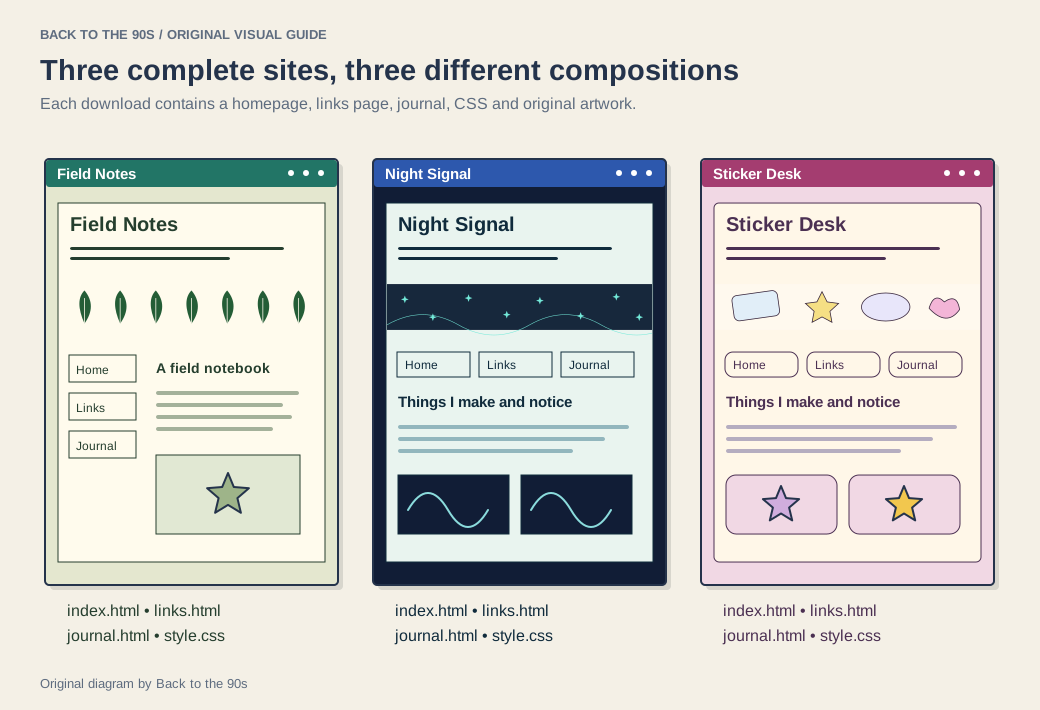
Each template includes its own banner artwork.
Field Notes: a quiet home for writing and collections

Field Notes puts navigation in a side column beside a broad reading area. Warm paper, dark green type and a repeating cross tile suit a walking journal, reading notebook or collection of observations. Its “Currently” panel gives you a small place to record what you are making, learning and collecting.
Open Field Notes · Download its ZIP.
Night Signal: a desk after dark

Night Signal uses a horizontal navigation bar, a dark blue reading surface and cyan accents. Its home-page cards give projects and recommendations their own doors. Use it for a music journal, a small programming log, short essays or an archive of creative experiments.
Open Night Signal · Download its ZIP.
Sticker Desk: a colorful scrapbook

Sticker Desk pairs rounded cards with a yellow header and pastel panels. Its generous spacing gives drawings and collected objects room to breathe. Start with a sketchbook, a fan collection, a craft diary or a page devoted to one very specific enthusiasm.
Open Sticker Desk · Download its ZIP.
Publish your first version
Neocities provides a browser dashboard for editing pages and uploading files. Its current tutorials teach HTML, CSS and JavaScript through a page you can publish as you work. Our Neocities guide introduces the service and the choices involved in starting a site.
- Extract one template ZIP into a folder on your computer.
- Open
index.htmlin a browser. Follow Links and Journal to see the complete site. - Open the three HTML files in a text editor. Replace the site name, introduction, current notes and sample entries.
- Upload
index.html,links.html,journal.html,style.css,banner.svgandtile.svgthrough your Neocities dashboard. Keep them together at the site root. - Open your public address and follow each navigation link. Narrow the browser window and check a phone-sized view.
If you already use those filenames, save a copy of the current files before replacing them. That copy gives you a clear starting point for your next revision.
What each file does
| File | Your first edit |
|---|---|
index.html |
Introduce yourself and describe the site |
links.html |
Add a recommendation and explain why it belongs |
journal.html |
Replace the sample entries with your own dated notes |
style.css |
Change the palette and adjust spacing |
banner.svg |
Edit the original illustration or use your own artwork |
tile.svg |
Change the small repeating background mark |
At the start of style.css, find the color custom properties. Change the outer background, reading surface, text and link colors there, then save and reload index.html. Use the same stylesheet for all three pages so the palette stays consistent.
The layouts move into a single column on small screens. Each template includes a skip link, visible keyboard focus and ordinary HTML navigation. Press Tab from the top of the page to follow the route a keyboard user takes through your content.
Add a fourth page
Duplicate journal.html as about.html, replace its heading and entries with your introduction, then add <a href="about.html">About</a> to the navigation in all four HTML files. Upload about.html and the three updated pages. Open About from each page to check the route.
For subject ideas, explore the Neocities field guide. Add an 88 × 31 site button when you have an address to share. The GeoCities history explains the publishing culture behind personal links pages and small graphics.
We release the template code and original SVG artwork under the MIT license. Keep the license with the source when you share a customized version.