MSN Messenger history: from the 1999 launch to Escargot
Published
MSN Messenger launched in July 1999. It showed a list of friends and who was online. Later versions added pictures, backgrounds, games and small face pictures called emoticons. Microsoft began moving Windows Live Messenger users to Skype in 2013. Today, Escargot runs a separate service for some old Messenger programs.
On this page
Microsoft announced MSN Messenger Service on 21 July 1999. Downloads began on 22 July. At launch, people could see who was online and use the service with Microsoft’s mail and browser software.
1999: find the people who are here
At launch, the service told you when friends came online so you could start a chat. It worked with Hotmail, Internet Explorer 5 and Outlook Express 5.
An email address identified your friend. The online sign showed whether they might be there to reply.
2003: make the conversation look like you
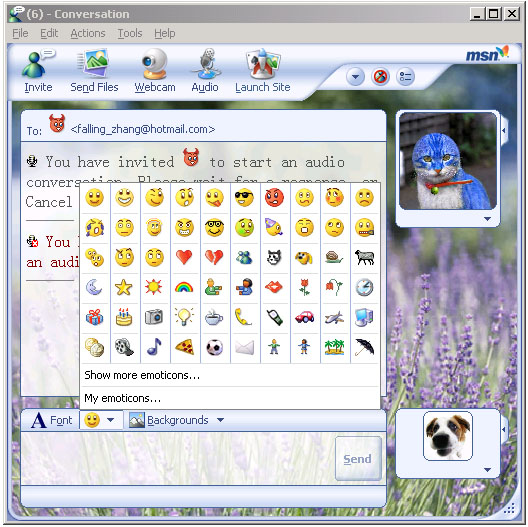
Microsoft’s June 2003 preview of Messenger 6 lists display pictures and custom backgrounds. It also lists moving emoticons, games and webcam chats. Microsoft said these features helped people show their personality.
A display picture appeared beside your name. A background sat behind the chat. Emoticons added faces to individual messages.
The preview also offered conversation logging to the hard drive, which saved chats on your computer. Friends could spin a Decision Wheel together during a chat.
Identify the version in a screenshot
Look for the program’s name or its About box first. Check whether you are seeing a list of friends or an open chat. Display pictures and moving emoticons help you recognize later versions such as Messenger 6. The 1999 launch came before those features.
2013: the original service moves towards retirement
The service began as MSN Messenger in 1999. It later used the name Windows Live Messenger. In April 2013, Microsoft began moving sign-ins to Skype, as its Messenger connection record explains. That move brought the original service towards closure.
A revival uses its own accounts and runs the chat through its own computers. You sign up again and add people who use that project. It cannot restore your old Microsoft account’s 2003 contact list.
Explore the Escargot revival
Escargot runs a new service for old versions of both Messenger programs. Check its support table to see which versions work with it before choosing one.
The project’s getting-started guide gives this sequence:
- Create an Escargot account.
- Choose a chat program through its connection guides and download pages.
- For the shortest setup, choose a pre-patched download, already changed to connect to Escargot. For an unpatched program, follow the setup steps in the guide for that version.
- Sign in to Escargot and add people who use the project.
Follow the surrounding chat culture
The emoticon history shows how typed faces became small pictures. The chat guide compares Messenger’s custom looks with AIM’s names, ICQ’s numbers and IRC’s rooms.