IRC chat rooms: networks, channels and getting started
Published
To use IRC, open a chat program called a client. Connect to a network, a separate chat service, and join a room called a channel, such as #libera. Your nickname appears beside your messages. You can talk to the group or send a private message to one person. Use both the network and channel name to find the right room.
On this page
Jarkko Oikarinen created Internet Relay Chat in 1988, as Libera.Chat’s introduction records. Oikarinen and Darren Reed later wrote the system’s rules in RFC 1459, published in May 1993. The document explains how nicknames, rooms and messages work.
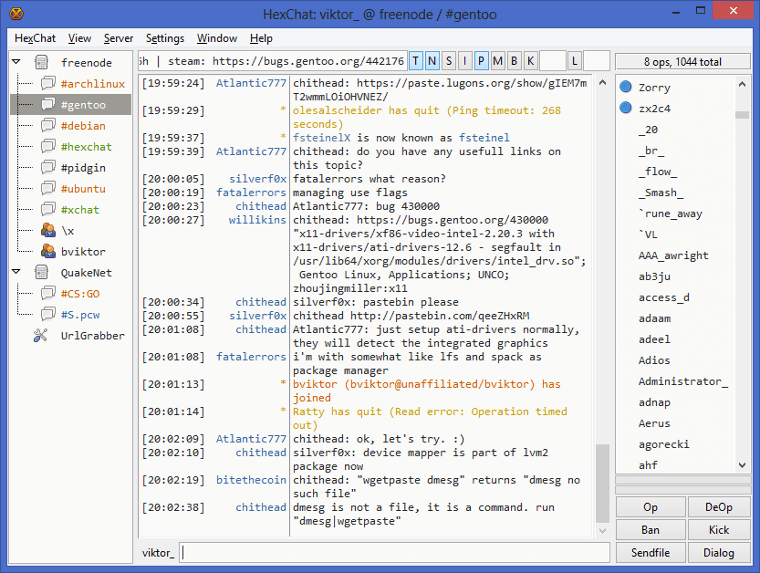
Separate the client, network and channel
The client shows chats and accepts the messages or commands you type. Two programs may show the same chat service with different layouts.
The network runs the computers that connect people. Each network has its own community and services. A #tiny-web channel on one network is separate from a channel with the same name on another. Ask for both the network and channel when following an invitation.
The channel is the shared conversation. Names commonly begin with a hash, such as the fictional #tiny-web in our exhibit. A topic helps explain what people discuss there, while the list of people shows who has joined.
Follow a small conversation
Open the original sample chat room. Press Next event to step through a sample conversation between PaperBoat, CloudNotes and TinyGarden. The example runs inside the page and uses fictional names and messages.
First, PaperBoat chooses a nickname and joins #tiny-web. The topic invites people to share a small website. CloudNotes describes a cloud notebook, PaperBoat mentions a boat collection, and TinyGarden joins the exchange.
Next, one message goes only to CloudNotes. A room chat and a private chat may appear beside each other but reach different people. The note below each event explains what is happening.
Learn a few useful commands
Libera.Chat’s guide explains that commands begin with / in the box where you type messages. These examples use the fictional names from the exhibit:
| Example | Purpose |
|---|---|
/nick PaperBoat |
Choose a nickname. |
/join #tiny-web |
Join the named channel. |
/msg CloudNotes Hello |
Address a message to that nickname. |
/part #tiny-web |
Leave that channel. |
Read the channel topic and recent conversation before contributing. A clear question with enough detail gives other people something useful to answer. Allow time for replies; people may stay signed in while doing other things.
Where mIRC fits
Khaled Mardam-Bey began making mIRC in late 1994. Its first public version appeared on 28 February 1995, according to his personal FAQ. mIRC is a Windows chat program for IRC networks.
The project’s current description covers group rooms, private chats and code for adding your own features. This is one chat program. IRC is the system it connects to.
Explore a current network
Libera.Chat offers a beginner guide and links to its own web chats. Start there to chat in your browser. You can also install a chat program and use Libera.Chat’s listed connection settings.
The official connection guide gives the address irc.libera.chat and port number 6697, with TLS turned on for an encrypted connection. Select the network in your program or enter those details using its instructions. Follow Libera.Chat’s account guidance if you want to register a nickname, then choose a relevant channel and read its topic.
In Libera.Chat’s web chat, select a nickname, connect, then enter /join #libera for the network’s help channel. Read the topic before asking a setup question. To leave that room, enter /part #libera; closing a room and disconnecting from the network are separate actions.
Compare chat rooms and friend lists
A chat room introduces people through a shared subject or activity. A chat app with a friend list starts with people you have already added.
Compare the starting points in AIM, MSN, ICQ and IRC. Or explore forums, where keeping replies under one topic changes the pace of a discussion.