2Advanced V3: the 2001 Flash site and its 2024 rebuild
Published
2Advanced V3 Expansions launched as a Flash website in 2001, as Web Design Museum’s historical entry records. Flash software ran its animations. The studio rebuilt it with Rive and React in 2024, using newer tools for animation and web pages. You can now explore its moving menus, images and sound in current browsers.
On this page
Eric Jordan founded the studio in 1999. 2Advanced’s history and Jordan’s rebuild case study explain how the project began and how Jordan later worked with Rive to rebuild it. Rive lists the V3 reboot in its 3 December 2024 press record.
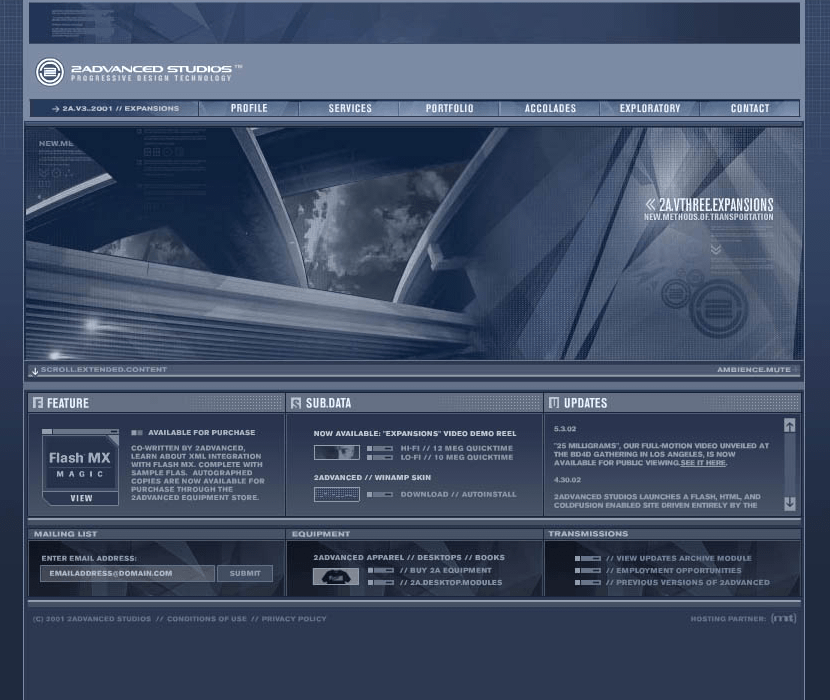
Put the two versions beside each other
Start at 2Advanced’s current homepage. It labels the V3 rebuild separately from the V4 and V5 Flash archives. Choose V3 to try the rebuilt design, or an archive to explore a later edition of the old site.
A screenshot shows the panels, lettering and main focus. Running the rebuild shows movement and responses to clicks. Label which version you studied: the 2024 rebuild may behave differently from the 2001 Flash file.
Read the site as a sequence
Record four stages with sketches or screenshots: arrival, orientation, selection and destination.
When the site opens, note its name and look. Then find the controls that show where you can go. Click one and watch the response. On the new page, read the content and find a link to another section.
Follow one transition
Click a menu item and watch the page change. Look for the first sign that it responded, the moving panels or pictures, and when the new words become readable. Decide whether the motion confirms your click, guides you to the next section or slows the task.
The interface was part of the portfolio
Before opening a client project, visitors could see how the studio handled images, movement and sound. The menus guided people to the work while showing those skills.
What the reconstruction makes possible
Choose one change to compare: the opening, a menu click or a new content panel. Write down what the old records show, then what you see in the rebuild. A new version can look similar but load, move or respond to the keyboard and mouse differently.
The Flash web history explains the earlier technology. The browser-emulation guide shows another way to open a saved site in an old browser.
Compare another themed website
Compare Space Jam’s menu, which uses mostly still picture links. 2Advanced adds moving panels and changes that follow a click.